Features Time tracking Pricing FAQ Contact
Self-hosted · version 1.7.2

Project management and time tracking — on your own server

CellFlow is a self-hosted project management and time tracking tool for companies of 5–30 people. Tasks, calendar, leave, planner and PDF reports — one portal instead of five tools, with no SaaS fees and no user limit.

Free trial · no credit card · we reply within 24h

Your data stays with you 3 languages: PL / DE / EN No per-user fees
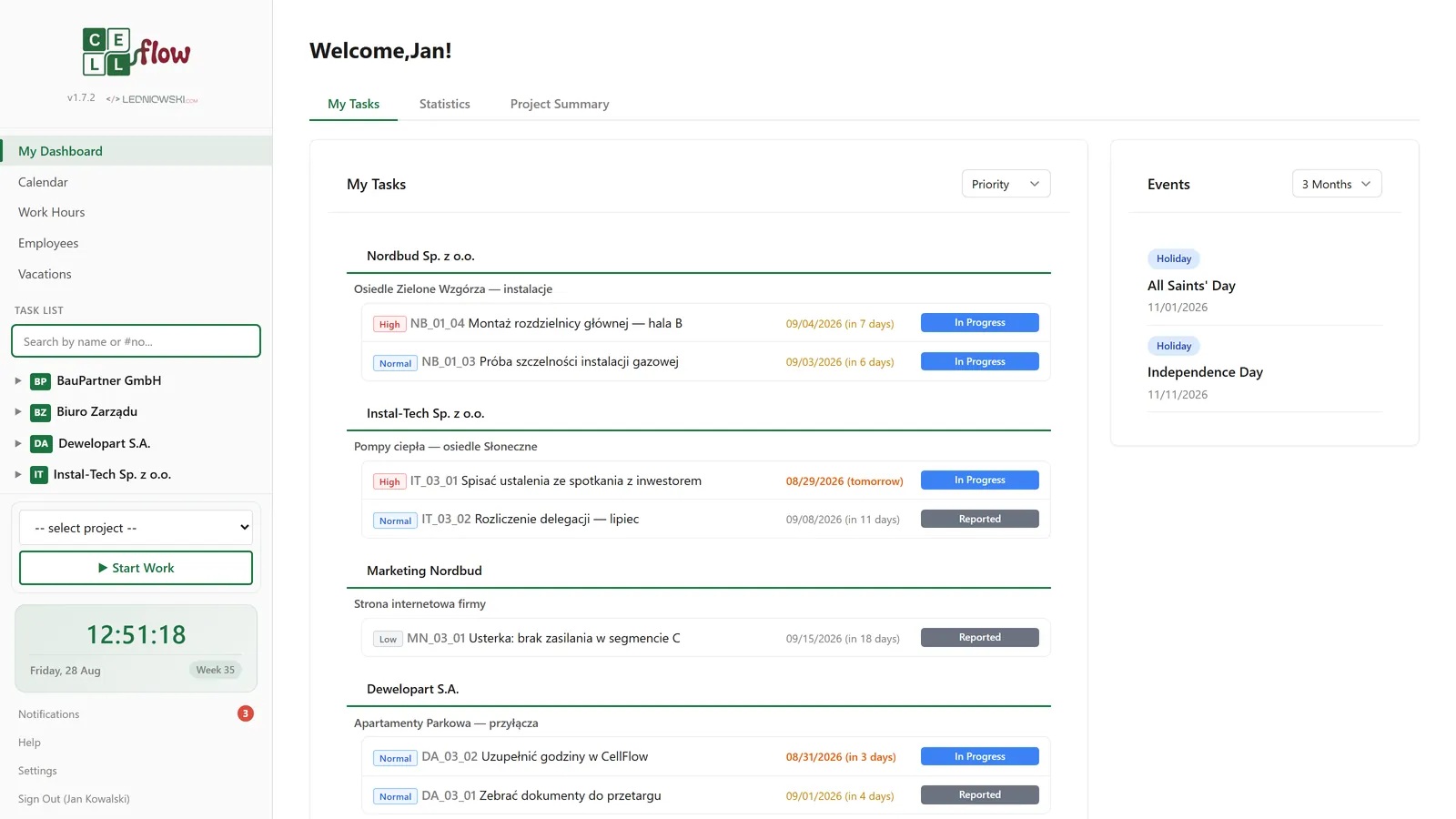
CellFlow dashboard — project management and time tracking for small teams
0
modules in one portal
0
interface languages
0
notification types to choose from
0
steps in the interactive tour
1.0 → 1.7
active development, regular releases

Five tools that don't talk to each other

Excel for hours, Jira for tasks, Google Calendar for leave, WhatsApp for questions, Drive for reports. Sound familiar?

The old way

Data scattered across five apps and email inboxes. Nobody knows who's on leave, how many hours the team worked, or where a project stands. The end of the month becomes data-collection day.

CellFlow

Projects, tasks, work hours, leave, calendar and reports in one place. Everyone knows what to do, and the monthly report is one click away. On your own server, at a fraction of SaaS costs.

Drag and compare

On the left: the chaos of five tools. On the right: one CellFlow.

Excel — Hours_2026.xlsx
Jan K. | 8:00–16:00 | Work
Anna N. | — | leave???
NO DATA FOR MARCH
Jira — Backlog
PROJ-142 To do
12 overdue tasks
Google Calendar
Who's on leave?
No entries
WhatsApp
"Can you send me the report?"
"Which project?"
Google Drive
report_FINAL_v3.pdf
report_FINAL_v3_NEW.pdf
The old way
CellFlow dashboard — all your company data in one place
CellFlow
Features

Six modules. One portal.

An alternative to Jira, Toggl, Google Calendar and the HR spreadsheet — in one tool whose parts actually talk to each other.

Tasks and projects

A Companies → Projects → Tasks hierarchy with automatic numbering. Statuses, priorities, 0–100% progress, deadlines, attachments, comments with @mentions and a full history of every change.

See how it works

Time tracking and leave

A work-hours register with 6 day types, a sidebar timer, leave requests with approval and a PDF, pro-rata balances, a capacity planner and reports for whole departments. CellFlow's deepest module.

See how it works

Team calendar

Leave, business trips, on-site work, task deadlines, birthdays and PL/DE holidays on a single screen.

More

Team and permissions

Profiles, departments, admin/user roles and project access under full control.

More

Dashboard and statistics

Charts for statuses, priorities and team workload. Decisions based on data, not gut feeling.

More

PDF and XLSX reports

An hours report with signature fields, a leave-request PDF, XLSX export from your own template.

More
What sets CellFlow apart

Time tracking and leave that Jira and Toggl don't have

This is not an add-on to tasks — it's a full work-hours register and leave management built for the realities of Polish and German companies.

Sidebar timerStart / stop with project selection, automatic saving and auto-stop after 8 h.
Day copyingCopy one day's entries to multiple dates at once — the system skips conflicts by itself.
Missing hoursThe admin sees at a glance who hasn't filled in their month — no reminder emails needed.
Leave requests with approvalRequest → admin decision → a print-ready formal Polish leave-request PDF with correct grammar.
Pro-rata leave balanceAccrual proportional to the month, plus extra days for working on Sundays and public holidays.
Capacity plannerA people × days grid: plan weeks ahead and move the plan into the calendar in one step.
XLSX from the client's templateExport the month straight into a spreadsheet in the exact format your contractor requires.
Online time tracking in CellFlow — work-hours register with day types
Team capacity planner — people by days grid
Leave balance and leave requests in CellFlow
Tasks and projects

From company to task in three clicks

A clear Companies → Projects → Tasks hierarchy with automatic numbering like NB_01_07. Every task has an owner, a status, a priority and a full activity history.

  • Inline editing: title, description, progress, deadline — no forms to open
  • Comments with replies, @mentions and likes
  • Attachments up to 10 MB: images, PDF, Office, ZIP
  • Activity log: who changed what and when — in black and white
Reported In progress Completed Verified
Project view in CellFlow with task list and statuses
Task details — comments, attachments and change history
Team calendar

No more asking "who's in when"

Leave, business trips, on-site work, task deadlines, birthdays and public holidays — all in one monthly view with week numbers.

  • Leave workflow: request → approval or rejection with a reason
  • Polish and German public holidays — including per-state (Bundesland) coverage
  • Overlays toggled from the legend: deadlines, holidays, birthdays
  • Clicking a day opens details and quick entry creation
CellFlow team calendar — leave, trips and holidays in one view
Dashboard and statistics

Open the portal and know what's going on

The dashboard shows your tasks grouped by company and project, a summary of the day and upcoming events. The statistics tab turns team data into clear charts.

  • Tasks by status and priority on pie charts
  • Team workload: who has too much, who can take on more
  • Closed tasks and work hours day by day
  • Upcoming deadlines, leave and birthdays in one stream
CellFlow statistics — charts for tasks, priorities and team workload
Team and notifications

Everyone knows what they need to know

Employee profiles with departments and per-project permissions. Notifications reach you where you work: in the app, in the browser and by email — in the recipient's language.

  • 10 notification types, each can be switched on or off individually
  • An @mention in a comment reaches the addressee instantly
  • Project access under control — no access means no visibility
  • Built-in AI translation of tasks and comments (OpenAI / Gemini)
Employee list in CellFlow with departments and roles
Personalization

A look that fits your company

Four color themes, full dark mode and three interface languages. Every employee sets up the app their own way — including an avatar cropped right in the browser.

  • Dark mode remembered per user
  • PL / DE / EN interface, switchable in settings
  • Interactive tour: ~89 steps tailored to each screen
  • Fully responsive — works on phones and tablets
CellFlow personalization settings — color themes
CellFlow in dark mode
Reports and documents

End of the month? Report's ready.

A monthly hours report with signature fields, a leave-request PDF and XLSX export into your contractor's template. Zero manual spreadsheet formatting.

  • Per-employee hours report on company letterhead
  • Aggregate reports: departments, projects, the whole company
  • Leave-request PDF with automatic, grammatically correct wording of the leave type
  • Email delivery via built-in SMTP
Admin monthly report — team hours by project
Work-hours PDF report ready to print and sign
Administration

Maintenance that doesn't need an IT guy

CellFlow takes care of itself: a daily database backup with no cron setup, one-click updates and a changelog the team sees after every release.

  • Automatic backups — the last 14 always at hand, downloadable from the panel
  • Deployment panel: signed package over HTTPS, automatic backup before every update
  • A "What's New" window after every update
  • SMTP settings with a send test and feedback reporting straight from the app
CellFlow admin panel — backups and updates

How does CellFlow compare to other tools?

An honest comparison with what companies of 5–30 people use most often.

CellFlow Jira Toggl Excel
Monthly cost 0 PLN / user — only your hosting Subscription for every user Subscription for every user Office license + manual work time
Company data On your server Vendor's cloud Vendor's cloud Scattered across files
Tasks and projects Yes Yes No Manual
Time tracking (day types, sick leave, travel) Yes, built in Paid plugins Timer only Manual
Leave requests + PDF Yes, with approval No No No
Team capacity planner Yes Paid add-ons No Manual
PDF / XLSX reports One click Limited Limited Manual
Deployment One ZIP on a server, a few minutes Configuration and training Quick, but narrow scope
Security

Your data never leaves your company

Self-hosted means more than no subscription. It means full control over where your employee, client and project data lives.

100% on your server

The SQLite database and files stay with you. Not a single byte goes to a vendor's cloud.

Every operation protected

CSRF tokens on every write, login attempt limits and automatic session expiry.

Access under control

Admin/user roles, per-project access and files served only to those authorized.

Daily backup

An automatic database backup every day, the last 14 at hand — no cron and no IT guy.

Updates under control

Signed packages over HTTPS, a backup before every deployment, a log of every attempt.

GDPR compliance made easier

Since your data never leaves your infrastructure, you don't need data-processing agreements with a SaaS vendor.

Pricing

No subscription. No per-user fees.

You pay once for a license tailored to your company, then only for your own hosting.

Free trial
0 PLN

Test CellFlow on your own processes — no credit card and no commitment.

  • Full version of the application
  • A 15-minute online demo to get you started
  • Help with your first steps
  • No credit card required
Start with the trial
Self-hosted license
CellFlow for your company
Individual quote

A one-time license with deployment and customization of the application to your company's processes.

  • No per-user fees and no account limit
  • Installed on your own server
  • Features tailored to your needs
  • Updates via the deployment panel
Request a quote
Running costs
from ~20 PLN / mo (~€5)

The only recurring cost is your own shared hosting with PHP and SQLite.

  • Ordinary hosting — no VPS, no DevOps
  • Backups run themselves
  • No hidden fees or paid feature tiers
  • The cost doesn't grow with headcount
Questions? See the FAQ

For comparison: popular SaaS tools for a 15-person team can cost hundreds of złoty a month — every month, forever. You buy CellFlow once, and your fixed cost is hosting from about 20 PLN (~€5).

Why do companies choose CellFlow?

Your data, your server

Self-hosted: your data stays with you. One ZIP on a PHP + SQLite server and it runs.

Light as a feather

PHP + SQLite + vanilla JS. Zero frameworks and dependencies. Runs on ~€5 hosting.

All in one

Replaces Jira, Toggl, Google Calendar and the HR spreadsheet. One login, one source of truth.

No more subscriptions

No per-user fees, no limits, no surprises on the invoice every month.

No training, from day one

A simple interface plus an interactive tour of ~89 steps. The team is productive from day one.

Developed with clients

From version 1.0 to 1.7.2 in regular releases. Your ideas can make it into the next version.

Frequently asked questions

Everything worth knowing before you book a demo.

What is CellFlow and who is it for?

CellFlow is a self-hosted tool for project management, time tracking and leave management. It was designed for companies of 5–30 people who want everything in one tool on their own server — with no SaaS fees and no user limits.

What modules does CellFlow include?

CellFlow includes 6 modules: tasks and projects with comments and a full change history, a team calendar with a leave workflow, time tracking with a timer and a planner, employee management with roles and permissions, a dashboard with statistics, and PDF reports plus XLSX export.

Does CellFlow replace Jira, Toggl and Excel?

Yes — CellFlow combines the functions of several tools in one portal. It replaces Jira (tasks and projects), Toggl (time tracking), Google Calendar (leave and business trips), HR spreadsheets (employee data and leave balances) and reporting tools (PDF and XLSX).

How much does CellFlow cost?

The trial is free and requires no credit card. The self-hosted license is priced individually — including tailoring the application to your company's needs. There are no per-user fees and no subscription; the only recurring cost is your own PHP + SQLite hosting, from about 20 PLN (~€5) per month. Details in the pricing section.

Is there a free trial?

Yes — we offer a free trial with no commitment and no credit card. Just book a 15-minute online demo, and afterwards you'll receive access to a trial instance.

What are the server requirements?

A server with PHP and SQLite is all you need — those are the only requirements. CellFlow uses no frameworks, no npm and no extra dependencies, so it runs on the cheapest shared hosting.

How does installation work and how long does it take?

Installation takes a few minutes: you upload a single ZIP file to a server with PHP and SQLite, open the address in your browser, and CellFlow is ready. No database configuration and no command line.

How does time tracking work in CellFlow?

Employees log their hours across 6 day types (on-site work, work abroad, travel, leave, extra leave, sick leave), assigned to a project and with a note. The system detects overlapping entries, lets you copy a day to multiple dates at once, and the sidebar timer tracks time automatically. Admins see reports per person, project and department, plus a list of missing hours.

Does CellFlow handle leave and leave requests?

Yes — the employee submits a request, the admin approves or rejects it with a reason, and the system generates a print-ready formal Polish leave-request PDF with correct grammar for the leave type. Leave balances accrue proportionally (pro-rata), with support for extra days off, e.g. for working on Sundays and public holidays.

Is my data safe?

CellFlow is self-hosted — your data never leaves your server. The application uses CSRF tokens on every operation, login attempt limits, session expiry, project- and file-level access control, and automatic daily database backups.

Does CellFlow make backups?

Yes — CellFlow automatically backs up the database every day (no cron setup required) and keeps the 14 most recent copies. The administrator can also run a manual backup at any time and download it from the settings panel.

How do CellFlow updates work?

An update is a single click: the deployment panel receives a signed package over HTTPS, backs up the current version by itself, and skips user data and files. After the update, the team sees a "What's New" window with the list of changes.

Can I customize the look for my company?

Yes — CellFlow offers 4 color themes, full dark mode and a responsive interface that works on your phone. The SPA architecture provides fast navigation without page reloads.

Does CellFlow support multiple languages?

Yes — the interface is available in Polish, German and English, and every user picks their own language. Notifications arrive in the recipient's language, and built-in AI translation (OpenAI or Gemini) translates tasks, descriptions and comments with an "original / translation" toggle.

Contact

Ready to ditch the spreadsheets
and work like a team?

Book a 15-minute online demo and get your free trial. No commitment, no credit card. We reply within 24 hours.

We're flexible — after the trial period we adapt features, look and processes to your company's needs.

or directly: kontakt@cellflow.pl

Book a demo